One Lucky Mom Svg Design: A Practical Guide to Quality, Compatibility, and Customization
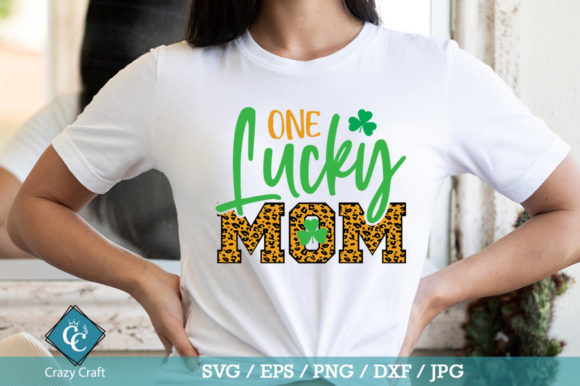
Celebrating motherhood through custom crafts is a rewarding experience, whether you are creating a heartfelt gift for your own family or building a product line for your small business. The One Lucky Mom Svg Design has become a popular choice for these projects due to its clean lines, versatile typography, and emotional resonance. However, the ease of downloading a digital file often leads creators to overlook critical technical details that can make or break the final product. Many beginners and even experienced crafters rush into cutting or printing without fully understanding file compatibility, layer management, or material selection. This oversight frequently results in wasted vinyl, ruined shirts, or frustrating software errors.
Understanding the nuances of this specific design package is essential for achieving professional results. The download typically includes SVG, EPS, DXF, JPG, and PNG formats in a zipped folder. While this variety seems comprehensive, knowing which file to use for which machine and project is not always intuitive. By addressing common pitfalls and offering corrective advice, you can ensure that your creative process is efficient, cost-effective, and yields high-quality outcomes every time.
Choosing the Right File Format for Your Machine
One of the most frequent mistakes users make is selecting the wrong file format for their specific cutting machine or design software. The One Lucky mom svg design is optimized for vector-based editing, but using a raster image like a JPG or PNG for cutting will lead to poor edge quality and potential machine errors. Vector files such as SVG, EPS, and DXF contain mathematical paths that allow cutters to follow precise lines, whereas raster images are made of pixels and cannot be cut cleanly without complex tracing processes that often fail.
For users of Silhouette Studio, it is important to note that the basic free version does not support SVG imports. Many newcomers purchase a design only to realize they cannot open it without upgrading to the Designer Edition or converting the file. In this case, the DXF format included in the zip folder is the correct alternative. Conversely, Cricut Design Space users should stick to SVG files for the best compatibility and ease of use. If you are working with Brother’s ScanNCut Canvas, Sure Cuts A Lot, or Make the Cut, both SVG and DXF are generally acceptable, but testing a small section first is wise to ensure node accuracy.
For those using professional graphic design software like Adobe Illustrator, CorelDraw, Affinity Designer, or Inkscape, the EPS or SVG formats provide the most flexibility. These programs allow you to ungroup elements, adjust nodes, and modify colors with precision. A common error here is opening an SVG in a browser or preview tool and assuming it is ready for print. Always import the file into your designated design software to verify that all layers are intact and editable before sending it to your printer or cutter.
Customization Errors and Layer Management
The appeal of the One Lucky Mom Svg Design lies in its customizability. You can add color, change elements, remove parts, and tailor the design to fit your specific vision. However, improper layer management is a significant hurdle for many creators. When you unzip the folder and open the SVG, you may find that certain elements are grouped together. If you attempt to change the color of just the text without ungrouping the design first, the entire image may change color, or the software may reject the action entirely.
To avoid this, always right-click and select "Ungroup" or "Release Compound Path" immediately after importing the file. This separates the text from any decorative elements, such as stars, hearts, or outlines, allowing you to assign different colors or materials to each part. For example, you might want the text in gold vinyl and the decorative elements in white. If the layers are not separated, you cannot achieve this multi-material look. Additionally, check for hidden nodes or stray points that may have been left in the original design. These invisible errors can cause your cutting machine to make unnecessary movements, slowing down production and wearing out your blade faster than necessary.
Another overlooked detail is the scalability of the design. While vector files are infinitely scalable, extreme resizing can sometimes distort thin lines or small text elements. If you plan to print the design on a large poster, ensure that the font weight is sufficient to remain legible. For small applications like stickers or jewelry tags, simplify the design by removing intricate details that may not cut cleanly at a reduced size. Testing a small prototype on scrap material is a best practice that saves time and resources in the long run.
Material Selection and Application Techniques
Even with a perfectly prepared digital file, the physical application of the One Lucky Mom Svg Design can fail if the wrong materials or settings are used. This design is marketed as perfect for T-shirts, mugs, paper, posters, invitations, stationery, scrapbooking, web designs, and stickers. Each of these surfaces requires a different type of vinyl or ink and specific heat or adhesive settings.
For T-shirts, many beginners mistakenly use standard adhesive vinyl instead of heat transfer vinyl (HTV). Adhesive vinyl will peel off after the first wash and feels stiff and uncomfortable against the skin. HTV is designed to bond with fabric fibers under heat and pressure, ensuring durability and comfort. When using HTV, remember to mirror your design before cutting. This is a critical step that is often forgotten, resulting in backward text on the final garment. Additionally, ensure that your heat press or iron reaches the correct temperature and duration specified by the vinyl manufacturer. Under-pressing leads to peeling, while over-pressing can scorch the fabric or degrade the vinyl.
When applying the design to mugs or hard surfaces, use permanent outdoor vinyl rather than indoor varieties. Outdoor vinyl is more resistant to moisture, UV light, and abrasion, making it suitable for items that will be washed frequently. For paper products like invitations and stationery, consider the weight and texture of the paper. Heavy cardstock works well with die-cutting machines, but thinner papers may tear during the weeding process. Adjusting the blade depth and pressure settings on your machine according to the material thickness is essential for clean cuts without damaging the backing sheet.
Verifying Commercial Use Rights and Quality
Before launching any product line featuring the One Lucky Mom Svg Design, it is crucial to verify the licensing terms. Many creators assume that purchasing a digital file grants them unlimited commercial rights, but this is not always the case. Some designers restrict the number of physical items you can sell or prohibit the use of the design in certain contexts. Always read the license agreement included in the zipped folder or on the download page. If the terms are unclear, contact the designer directly for clarification. Respecting intellectual property rights protects your business from legal issues and supports the creative community.
Finally, evaluate the quality of the nodes in the vector file. High-quality SVGs have smooth curves and minimal anchor points. Poorly constructed files may have jagged edges or excessive nodes, which can cause chopping or stuttering in cutting machines. If you notice irregularities, use the node editing tools in software like Inkscape or Adobe Illustrator to smooth out the paths. This extra step ensures that your cuts are crisp and professional, enhancing the overall presentation of your final product.
By paying attention to file formats, layer management, material compatibility, and licensing, you can maximize the potential of the One Lucky Mom Svg Design. These practical adjustments transform a simple digital download into a versatile asset for your creative projects, ensuring satisfaction for both you and your recipients or customers.