Understanding Multicolor Leopard Distressed Patches for Creative Projects
In the evolving landscape of digital design and textile customization, finding assets that balance aesthetic appeal with technical versatility is crucial. Multicolor Leopard Distressed Patches have emerged as a distinctive resource for designers, crafters, and small business owners looking to add a rugged, vintage-inspired edge to their work. Unlike standard, clean-cut graphic elements, these distressed patches offer a worn-in look that mimics the texture and character of aged fabric or vintage embroidery. This article explores the unique characteristics of these digital assets, compares them to alternative design styles, and provides practical guidance on when and how to integrate them into your creative workflow.
The Distinct Appeal of Distressed Aesthetics
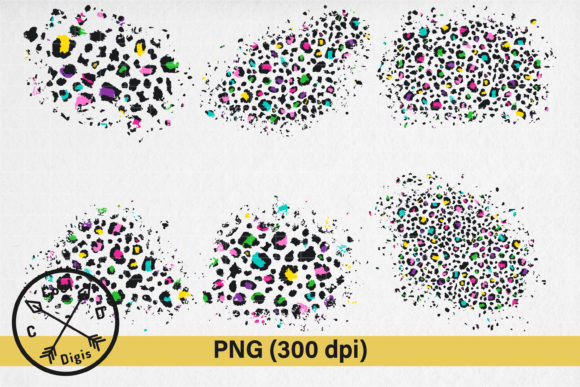
The primary value proposition of Multicolor Leopard Distressed Patches lies in their texture and visual depth. Standard leopard print clipart often appears flat and digitally perfect, which can sometimes feel sterile or out of place in designs aiming for authenticity. The "distressed" element introduces intentional imperfections—faded edges, subtle cracks, and uneven color saturation—that replicate the natural wear and tear of physical materials. This aesthetic is particularly popular in current fashion trends that favor retro, grunge, or bohemian styles.
When evaluating these assets, it is important to recognize that the multicolor aspect adds another layer of complexity and utility. Traditional leopard prints are typically limited to black and brown tones. However, modern interpretations often utilize vibrant, non-traditional color palettes. This allows designers to match specific brand colors or seasonal themes without losing the recognizable animal print pattern. The combination of vibrant hues with a weathered texture creates a dynamic visual contrast that captures attention more effectively than uniform patterns.
Digital Formats: PNG vs. Vector Alternatives
A critical decision point for any designer is choosing the right file format. The collection in question offers high-resolution PNG files, which are raster images. Understanding the tradeoffs between PNGs and vector formats (such as SVG or AI) is essential for determining if this product fits your needs.
- PNG Advantages: The provided 300 DPI RGB PNG files are ideal for sublimation printing, direct-to-garment (DTG) printing, and web-based projects. Because they are pre-rendered with specific textures and distressing effects, they require no additional editing to achieve the desired look. The transparent background inherent to PNG format allows for easy layering over various substrate colors without manual cutout work.
- Vector Limitations: While vector files are infinitely scalable and editable, recreating complex distressed textures in vector format can be computationally heavy and often results in a loss of the organic, random nature of the distress. For users who do not have advanced skills in Adobe Illustrator or CorelDraw, working with pre-made raster textures is often more efficient.
However, there is a limitation to note. Since these are raster images, they must be used at or below their original resolution to maintain quality. While the files are large and high-resolution, excessive upscaling beyond their intended size may result in pixelation. For most t-shirt designs, tote bags, and wall art, the provided resolution is sufficient, but designers working on massive billboard-sized prints should verify the dimensions before purchase.
Comparison with Other Design Resources
When sourcing graphics for textile printing or digital backgrounds, creators often choose between stock photography, custom illustration, and pre-made clipart collections. Here is how Multicolor Leopard Distressed Patches compare to these alternatives:
Stock Photography
Using stock photos of actual leopard print fabrics can provide realism, but it often lacks flexibility. Isolating the pattern from the background requires significant photo editing skill, and lighting inconsistencies can make it difficult to blend the image into a new design. Pre-made PNG patches eliminate this hurdle by providing isolated, ready-to-use elements with consistent lighting and transparency.
Custom Illustration
Hiring a designer to create custom distressed patches offers complete uniqueness but comes with higher costs and longer turnaround times. For small businesses or hobbyists operating on tighter budgets, digital download collections offer a cost-effective middle ground. They provide professional-quality aesthetics without the premium price tag of bespoke work.
Standard Clipart
Generic clipart often suffers from overuse, making designs look generic. The specific niche of "distressed" and "multicolor" leopard prints helps differentiate products in a saturated market. The worn texture adds a perceived value of craftsmanship, even when applied digitally.
Technical Requirements and Software Compatibility
To effectively utilize these digital assets, users must have prior knowledge of sublimation processes or digital design workflows. The files are delivered in a ZIP folder containing six high-quality PNG elements. While the format is widely supported, the quality of the final output depends heavily on the software and hardware used.
Recommended software includes Adobe Photoshop, GIMP, PaintShop Pro, or Canva (for simpler adjustments). These programs allow users to resize, rotate, and layer the patches effectively. It is crucial to ensure that your software supports 300 DPI resolution handling to prevent accidental downscaling during the design phase. For those using sublimation printers, understanding color management is vital. Since the files are in RGB color space, colors may shift when converted to CMYK for certain printing methods. Users should always perform test prints to calibrate their expectations regarding color fidelity.
Best-Fit Use Cases and Applications
Identifying the right application for these patches ensures maximum return on investment. The versatility of the Multicolor Leopard Distressed Patches makes them suitable for a variety of projects:
- Apparel Design: Ideal for t-shirts, hoodies, and leggings. The distressed look pairs well with denim jackets or canvas totes, creating a cohesive vintage aesthetic.
- Sublimation Products: Perfect for mugs, phone cases, and mouse pads where full-color, high-detail images are required. The transparent background allows the design to wrap seamlessly around curved surfaces.
- Digital Media: These PNGs can serve as textured overlays for web backgrounds, social media posts, or digital invitations, adding depth to flat digital layouts.
- Scrapbooking and Paper Crafts: For those who print at home, these high-resolution files can be printed on sticker paper or cardstock for physical crafting projects.
Decision Factors: When to Choose This Option
Choosing Multicolor Leopard Distressed Patches is the right decision if you prioritize speed, aesthetic consistency, and ease of use. If you are launching a product line quickly and need reliable, high-quality graphics that do not require extensive manipulation, this digital download is an efficient solution. It is also an excellent choice for designers who want to experiment with trending animal prints without committing to a single color scheme.
However, this option may not be suitable if you require fully editable vector paths for large-scale signage or if you need exclusive rights to the imagery for trademark purposes. Additionally, if your target audience prefers ultra-modern, minimalist, or clean-line aesthetics, the distressed texture might clash with your brand identity. Always consider your specific audience preferences and the technical capabilities of your printing equipment before finalizing your design choices.
In conclusion, these digital assets offer a balanced blend of style and functionality. By understanding the technical requirements and comparing them against your project needs, you can leverage these multicolor leopard designs to enhance your creative outputs effectively.